Real Piano
- 3.7
- Rating
- 100.00M
- Installs
- Free
- Price
 Analysis by App-foxy
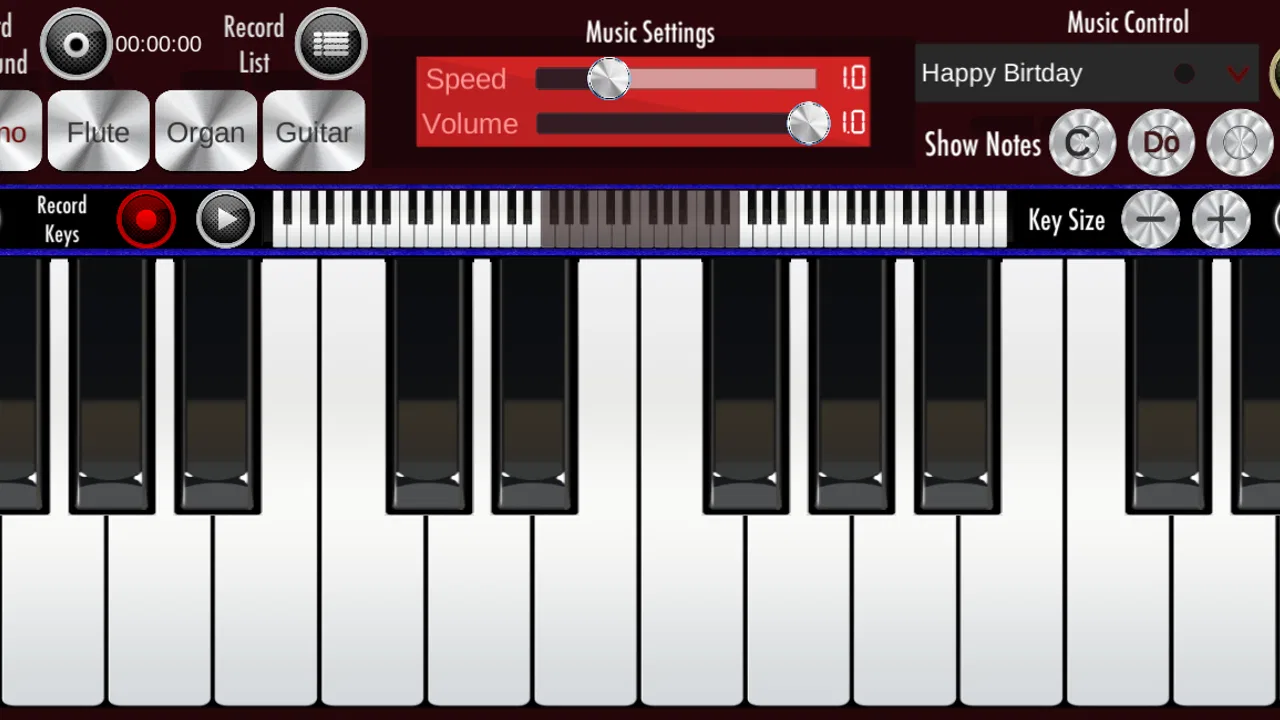
I approached Real Piano as a quick music game rather than a replacement for a full digital piano. Its appeal is immediate: open it, see piano keys, and start tapping. That simplicity makes it easy to try during a short break, but it also means the experience depends heavily on your phone, your touch accuracy, and what you expect from a piano app.
Developed by Bilkon, this free Android game sits in the music category and is suitable for Everyone. It has been available since June 2, 2017, and its current version is 1.28. With over 100 million installs, it is clearly familiar to a large audience, although its average rating of 3.7 from around 259 thousand ratings suggests that the experience is useful for some players and frustrating for others.
Getting past the first points of friction
The first thing I would tell a new user is not to judge the app during the first few seconds. A piano app can feel wrong when the phone is held awkwardly, the screen is crowded by other controls, or the player expects the display to behave like a physical keyboard. Before trying to play anything complicated, I would place the phone on a stable surface and use both hands if the screen layout allows it.
You May Also Like

 AccuWeather: Weather Radar
AccuWeather Review: A Quick, Clear Forecast for Everyday Decisions
For everyday plans, the best forecast is the one you can understand quickly. AccuWeather makes rain timing, radar, and local conditions easy to act on, with a few trade-offs.

 Hill Climb Racing
Why Hill Climb Racing Still Turns Crashes Into One More Run
A tiny car, a bumpy hill and one more upgrade: Hill Climb Racing keeps resurfacing because its simple chaos makes every near-miss feel personal.

 AliExpress - Shopping App
AliExpress Makes Global Shopping Feel Personal, but Shoppers Bear the Risk
AliExpress turns a global marketplace into a pocket-sized discovery engine. Its reach is useful, its shopping loop compelling, and its trade-offs easy to miss.

 Lords Mobile: Kingdom Wars
Lords Mobile Is a Kingdom-Building Routine, Not a Quick Match
A case-by-case verdict on the building, battles, device demands, and social commitments that make Lords Mobile rewarding for some players and exhausting for others.

 PDF Scanner app - TapScanner
TapScanner Makes Paperwork Easier to Capture, Check, and Share
TapScanner makes scanning with a phone feel less like a rescue operation and more like a dependable step in getting work done. Its capture tools are useful, though not flawless.

 Block Blast!
 Shows How Much a Puzzle Game Can Leave Out
A quiet grid game shows why puzzle players increasingly value instant clarity, repeatable skill and low-pressure play—and where the genre still needs to catch up.
More From Our News Desk
View All News


That small change matters because finger placement is less forgiving on a phone than on a real keyboard. When the device is moving in your hand, a tap can land on a neighboring key, especially if you are trying to play quickly. I found that a flat position gives better visual control and makes it easier to repeat a short phrase without constantly adjusting the device.
Another common sticking point is confusing a missed tap with a problem in the game. If a note does not sound as expected, try a slow sequence using one finger at a time. This separates timing mistakes from touch problems. It is also a useful way to learn the spacing of the keys before attempting faster playing.
The best first test is a simple, repeatable phrase, not a difficult song. Play the same few notes several times and watch whether the same touch produces the same result. If it does, the basic input is probably working and the remaining challenge is coordination. If the result changes unpredictably, check the phone before blaming the app.
Simple setup checks that save time
Because Real Piano is designed for Android, the device itself has a major influence on comfort. The minimum operating system is Android 7.1, so users on older software should check compatibility before spending time troubleshooting. On a supported phone, I would close other demanding apps, clean the screen, and make sure the device is not being used while it is overheating.
A dirty or damp screen can make taps feel inconsistent. So can a thick screen protector, particularly when playing near the edge of a key. I would not remove accessories immediately, but I would test the same short phrase with clean, dry fingers and a clear display. That quick comparison often explains why a key seems unresponsive.
Sound deserves its own check. Start with the phone's media volume rather than relying only on the side buttons, then make sure silent or do-not-disturb settings are not masking the result. If headphones are connected, disconnecting them can help identify whether the sound is being routed somewhere unexpected. These are ordinary phone checks, but they are especially important in a piano game because visual feedback alone can make a silent tap look like a failed note.
I also recommend testing the app after rotating the phone only if the interface supports the position comfortably. A wider view can make keys easier to target, while a narrow view may be more convenient for one-handed use. The right choice depends on the device, so I would keep the orientation that gives the clearest separation between neighboring keys rather than choosing based on habit.
There is no need to treat the initial setup like a music lesson. Real Piano works best when you decide what you want from it first. If you want a few minutes of finger practice or a playful way to explore notes, basic setup is enough. If you want accurate technique, detailed instruction, or a serious practice routine, you should keep those expectations separate from what this lightweight game can reasonably provide.
Recovering when a playing session goes wrong
When a session starts behaving strangely, I would avoid repeatedly tapping faster in the hope that the problem will disappear. Instead, stop and replay the same small pattern. This gives you a reference point. If the pattern works after slowing down, the issue was probably timing or hand position. If it still fails, leave the playing screen and reopen it before trying more complicated troubleshooting.
A useful recovery routine is deliberately boring: pause, check sound, clean the display, close the app, and start again. It prevents several different problems from being mixed together. For example, changing volume, rotating the phone, and rapidly switching between screens at once makes it difficult to know which action helped.
If the app becomes unresponsive, the safest general step is to exit it normally and relaunch it. On Android, checking whether the application itself needs an update can also be sensible, but I would avoid installing unofficial versions or downloading files from unknown sources. A music game is not worth exposing your phone to questionable software.
When a restart fixes the issue only temporarily, look for a pattern. Does it happen after the phone has been in use for a long time? Does it happen only with headphones? Does it occur when several fingers touch the screen together? Writing down that pattern is more useful than simply concluding that the game is unreliable, because the cause may be the device environment rather than the app.
I would also keep the playing area free from accidental touches. Notifications, gesture controls, and a case with raised edges can interfere with a narrow keyboard. Turning the phone slightly or placing it farther from the edge of the table may be enough to prevent your palm from touching something unintended.
What the app can and cannot replace
The biggest strength here is convenience. A physical keyboard is expensive, takes up space, and is not something most people carry around. A dedicated piano-learning app may offer a more structured path, while a real instrument gives you richer sound and more expressive control. Real Piano occupies the casual middle ground: it lets you interact with piano-style keys without requiring equipment or a long commitment.
That makes it a good fit for a child exploring music, a beginner who wants to understand the basic layout of notes, or someone looking for a quick distraction with a musical theme. The Everyone age rating also makes it easier to consider for shared family use, although younger players may still need help with device handling and volume.
It is less suitable for a learner who needs guided lessons, visible progress tracking, formal exercises, or detailed feedback on technique. It is also not the choice I would make for someone preparing pieces seriously. Touching a glass screen does not reproduce the resistance, spacing, or dynamics of a physical keyboard, so habits formed here should not be treated as a complete substitute for practice on an instrument.
Compared with a music-streaming app, this game is interactive rather than passive: you make the notes instead of listening to someone else perform them. Compared with a full piano simulator, its value is its low commitment. Compared with a traditional rhythm game, the piano presentation may feel more direct, but players who want complex scoring systems or a strong progression structure may find the experience too simple.
Everyday uses that make sense
One realistic use is a short break away from home. I can imagine opening it while waiting for an appointment, placing the phone on my lap or a nearby table, and repeating a small melody for a few minutes. The session does not require carrying a keyboard, and the free price removes the need to decide whether a brief experiment is worth paying for.
Another useful situation is helping a child connect sound with the visual order of keys. Rather than handing over the phone and expecting independent learning, I would sit beside the child and ask them to find a note, repeat it, and compare higher and lower sounds. That turns the app into a small shared activity instead of an unstructured tapping screen.
A more practical tip is to use it for idea capture, not final composition. If a tune comes to mind, tapping a rough version can help you remember its direction before you move to a better instrument or a dedicated recording tool. I would keep the phrase short and focus on the relationship between notes, since a phone screen is not the easiest place to edit or preserve a complete musical arrangement.
It can also work as a low-pressure way to overcome hesitation. Some beginners avoid instruments because they worry about making mistakes in front of others. A phone lets them explore privately. Once the basic layout feels familiar, they can decide whether a lesson, a keyboard, or another music app is worth pursuing.
When the phone, not the game, is responsible
It is tempting to blame Real Piano whenever sound cuts out or taps feel late, but mobile devices introduce several variables. Bluetooth audio can add delay, background activity can affect responsiveness, and a crowded screen can make accurate tapping harder. None of these automatically means the game itself is defective.
To isolate the cause, compare three situations: the phone's built-in speaker, wired or wireless audio if available, and another app that responds to touch. If touch feels normal elsewhere but sound behaves differently through one audio route, the audio setup deserves attention. If several apps show the same delayed touch response, the device or its current workload is the more likely source.
Storage and system health can matter too. A phone that is nearly full, running hot, or burdened by many open processes may behave less smoothly than it does after a break and restart. I would make those general checks before deleting and reinstalling the game, especially if other apps are also showing unusual behavior.
Reinstallation should be a later step, not the first reaction. Removing an app can erase local state or reset personal settings, and it does not solve a hardware limitation. If you do reach that point, use the official Android distribution channel and confirm that your device still meets the Android 7.1 minimum requirement before installing again.
There is also a difference between latency and musical expectation. A real piano responds with a physical action that players feel under their fingers. A phone translates a touch into sound through software and a small speaker. Even when everything is working correctly, it will not feel identical. That is a limitation of the format, not necessarily a fault in Bilkon's game.
Who should try it and who should skip it
I would recommend Real Piano to someone who wants immediate, casual piano interaction on an Android phone. It is especially appealing if you value convenience, do not own a keyboard, and are happy to spend short sessions experimenting with notes. Its large install base shows that the basic idea has broad reach, while the free price makes trying it straightforward.
I would be more cautious about recommending it to a serious student. If your priority is posture, finger independence, expressive dynamics, or a carefully sequenced curriculum, choose a real keyboard or a dedicated learning product instead. You may still enjoy this game as a portable sketchpad, but it should not become your only practice environment.
Players who dislike troubleshooting may also want to keep expectations modest. A phone's screen size, audio routing, and touch behavior can all affect the session. The app is easiest to enjoy when you accept that it is a compact music game, not a studio instrument.
The rating of 3.7 is a fair reminder to approach it with that distinction in mind. It is not a promise of a polished professional piano experience, and the store summary's simple emphasis on fun is closer to the truth than any expectation of advanced musicianship. In my experience, the app earns its place through accessibility rather than depth.
My practical verdict
After looking at both the enjoyable side and the friction points, I see Real Piano as a convenient first step into piano-style play. It is free, easy to test, broadly compatible with Android devices that meet its minimum requirement, and suitable for casual use. The current version, 1.28, keeps the product identifiable for anyone checking whether their installation is up to date.
My advice is to begin with a stable phone position, clean fingers, ordinary speaker output, and a very short note pattern. Those checks answer most early questions about sound and touch without turning a simple game into a technical project. If the same problem appears across other apps, investigate the phone. If only this app misbehaves after the basic checks, then restarting or using the official update path is reasonable.
Choose it for quick musical exploration, not for replacing a piano teacher or a physical keyboard. That honest boundary is what makes the app easier to appreciate. I would keep it installed for spontaneous practice, melody reminders, or a family activity, while choosing a more specialized alternative whenever structured learning, recording, or realistic performance becomes the main goal.
FAQs for Real Piano
01What features does Real Piano offer for beginners?
Real Piano is designed with beginners in mind, offering a range of features such as interactive tutorials, adjustable difficulty levels, and a virtual teacher mode. The app also includes a variety of songs to practice with, making it easy for newcomers to gradually build their skills and confidence.
02Can I customize the sound settings on Real Piano?
Yes, Real Piano allows users to customize the sound settings to suit their preferences. You can choose from different piano types, adjust the reverb and echo effects, and even record your own sessions. This flexibility ensures that the app meets the unique needs of each user, enhancing the overall experience.
03Is Real Piano available for both Android and iOS?
Real Piano is available on both Android and iOS platforms. The app is designed to perform optimally on a wide range of devices, ensuring that users have a seamless experience regardless of their operating system. You can download it from the Google Play Store or the Apple App Store.
04Are there any in-app purchases or ads in Real Piano?
Real Piano offers a free version with ads and some limitations on features. However, users can opt for in-app purchases to remove ads and unlock additional features, such as premium songs and advanced tutorials. This allows users to enhance their learning experience based on their preferences.
05How does Real Piano support advanced players?
Real Piano is not just for beginners; it also caters to advanced players by offering complex compositions and advanced tutorials. The app includes features like multi-touch support and MIDI connectivity, allowing experienced pianists to practice and perform with precision. This makes it a versatile tool for all skill levels.
Pros
- User-friendly interface for beginners.
- Wide range of sound options.
- Customizable keyboard layouts.
- High-quality audio output.
- Supports multi-touch for chords.
Cons
- Ads can be intrusive at times.
- Limited free features without purchase.
- Occasional lag on older devices.
- Large app size consumes storage.
- Requires internet for some features.

Real Piano
Gallery